


⚠️ Within 60 seconds of a VPS going online, automated bots are already attempting to break in without exception.
Our teams observe this reality on a daily basis during infrastructure audits. To illustrate the scale of the phenomenon: a bare Ubuntu server, with no DNS, no public announcement, exposed solely via its raw IP address, receives on average more than 200 SSH connection attempts within its first hour of existence. Automated bots continuously scan the entire internet in search of vulnerable configurations.
Regardless of the size of your organization — startup, SME, or large enterprise — attack patterns are identical. And yet, during our audit engagements, we consistently uncover the same unresolved vulnerabilities. This guide details the seven most common mistakes and, above all, how to eliminate them effectively.
Error #1 — non-automated security updates
All software contains vulnerabilities. This is a fundamental reality of software development. The difference between a compromised server and a secure server often comes down to one thing: the regular application of security patches. An unpatched system is a known vulnerability with a documented exploit, and attackers know it.
A server that has been running for 400 days without a restart or an update is not a technical achievement. It is a warning signal.
Implementation: enable automatic updates
On Ubuntu and Debian, the unattended-upgrades package handles the automatic application of security patches:
 Activation of the
unattended-upgrades package
Activation of the
unattended-upgrades package
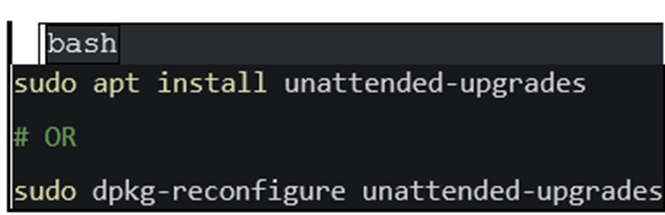 Service activation and
verification
Service activation and
verification
Once configured, verify that the service is active. On CentOS/RHEL, the equivalent is dnf-automatic. The objective is straightforward: no critical security patch should await manual intervention.
Error #2 — administering the server directly as root
The root account has absolute rights over the system. A single manipulation error, a compromised session, a malicious script executed inadvertently — and the entire server is exposed. Working as root on a daily basis is a high-risk practice that we strongly discourage.
Best practice consists of creating a dedicated user account with elevated privileges only when necessary (via sudo), and completely disabling remote root login.
Implementation: create a secure administration account
Here is the recommended sequence for securing administrator access :
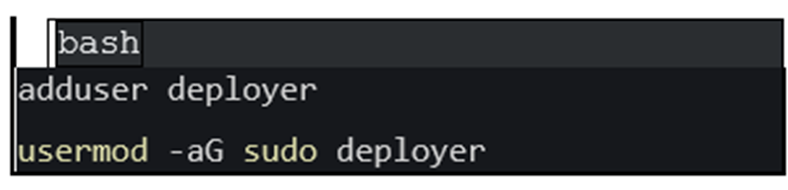 Creating a non-root user
with sudo privileges
Creating a non-root user
with sudo privileges
⚠️ Critical: always test the connection with the new account in a separate terminal BEFORE closing your root session.
Once the new account has been validated, disable root login in the SSH configuration file (PermitRootLogin no) and restart the SSH service.
Error #3 — SSH password authentication
Passwords are subject to brute force attacks, database breaches and social engineering. A properly generated SSH key, on the other hand, is mathematically impossible to crack within a reasonable timeframe. Yet the majority of VPS servers remain configured with password authentication enabled.
Implementation: deploy SSH key authentication
Step 1 — generate a key pair on your local workstation (ed25519 algorithm, the most secure currently) :
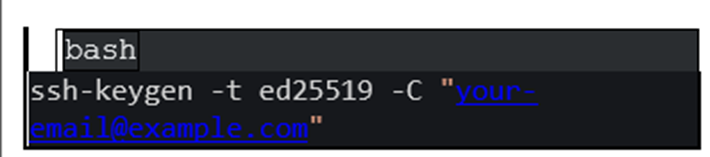 Generating an ed25519
key pair
Generating an ed25519
key pair
Step 2 — transfer the public key to the server :
 Copy of the public key to the server
Step 3 — update the SSH configuration (/etc/ssh/sshd_config) :
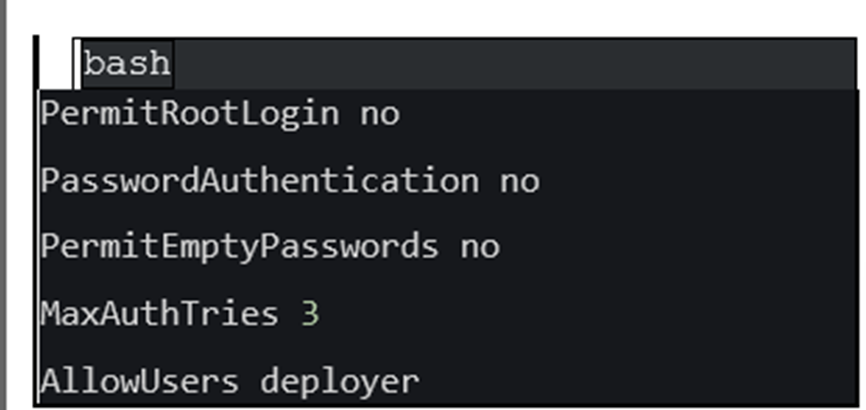 sshd_config configuration
Step 4 — restart the SSH service :
 Restarting the SSH service
🔑 Absolute rule: keep your current session open and test the key-based connection in a new terminal before making any irreversible changes.
Error #4 — absence of firewall
Without a firewall, every open port on your server is potentially accessible from any IP address in the world. Every service exposes an attack surface. The basic rule: only allow strictly necessary traffic, everything else must be blocked by default.
Implementation: configure UFW (Uncomplicated firewall)
UFW is the reference tool for firewall management on Debian/Ubuntu distributions. Here is the recommended minimum configuration:
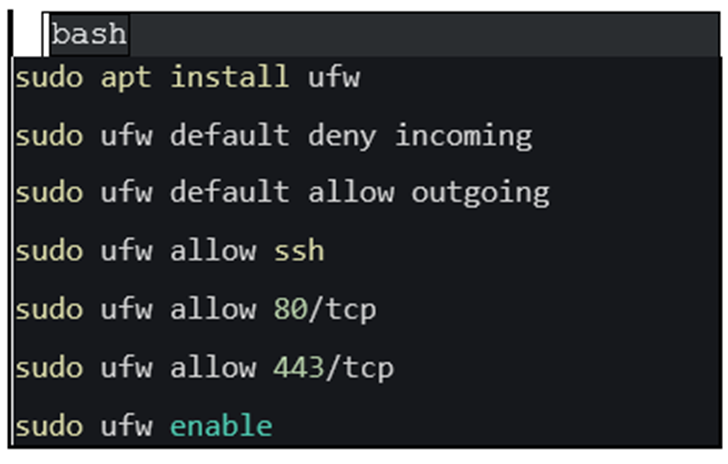 UFW configuration — default
policy and opening of required ports
UFW configuration — default
policy and opening of required ports
Default policy: all incoming traffic is denied, all outgoing traffic is allowed. Only open ports corresponding to services that are actually active (SSH, HTTP, HTTPS, etc.). Every unnecessarily open port is an opportunity offered to attackers.
💡 If you change the default SSH port (22), allow the new port BEFORE enabling UFW — or risk locking yourself out of the server.
Error #5 — absence of brute force protection
Even with SSH keys deployed and passwords disabled, automated connection attempts will not stop. Thousands of bots constantly scan the SSH port and generate voluminous logs, consume resources, and can mask a genuine intrusion attempt in the background noise.
Fail2Ban analyses system logs in real time and automatically bans IP addresses that exceed a configurable threshold of failed authentication attempts.
Implementation: install and configure Fail2Ban
Installation and basic configuration:
 Installing Fail2Ban and
creating the local configuration file
Installing Fail2Ban and
creating the local configuration file
Recommended configuration for the SSH jail:
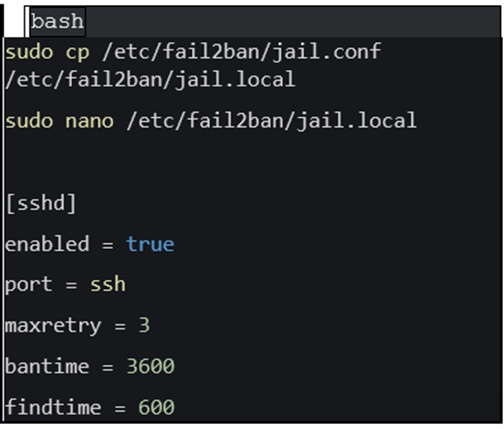 SSH jail configuration — 3
max attempts in 10 minutes, 1-hour ban
SSH jail configuration — 3
max attempts in 10 minutes, 1-hour ban
Result: 3 failed authentication attempts within 10 minutes automatically trigger a one-hour ban. This configuration eliminates virtually all the noise generated by scanning bots.
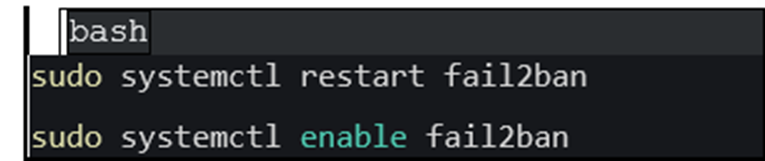 Checking active bans
via Fail2Ban-client
Checking active bans
via Fail2Ban-client
Error #6 — unnecessary services listening
A fresh Linux installation often includes services started by default that you have no need for: FTP server, telnet, databases exposed on unfiltered ports, print servers... Each of these listening services represents an additional attack surface.
The rule is simple: if a service does not fulfil an active and necessary function, it must be stopped and disabled.
Implementation: audit and reduce the exposure surface
Start by listing all ports listening on your server:
 Audit of listening ports with
ss -tulpn
Audit of listening ports with
ss -tulpn
For each identified port, ask yourself the question: is this service essential? If the answer is no, disable it:
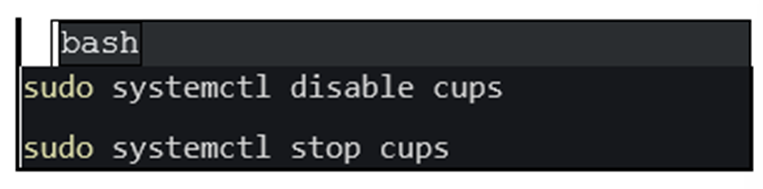 Disabling unnecessary services
with systemctl
Disabling unnecessary services
with systemctl
Reducing the attack surface is one of the most effective and most often overlooked security measures. Fewer active services = fewer potential attack vectors.
Error #7 — absence of backup strategy
Security is not limited to intrusion prevention. It also encompasses the ability to recover after an incident. A compromised server, a ransomware attack, a hardware failure: if you do not have recent and tested backups, you are starting from scratch.
A sound backup strategy rests on three principles: automation, offsite storage (backups must never reside on the same server as the data), and regular restoration verification.
✅ mise en œuvre : automatiser les sauvegardes chiffrées
Here is a simple and efficient backup script, to be scheduled via cron:
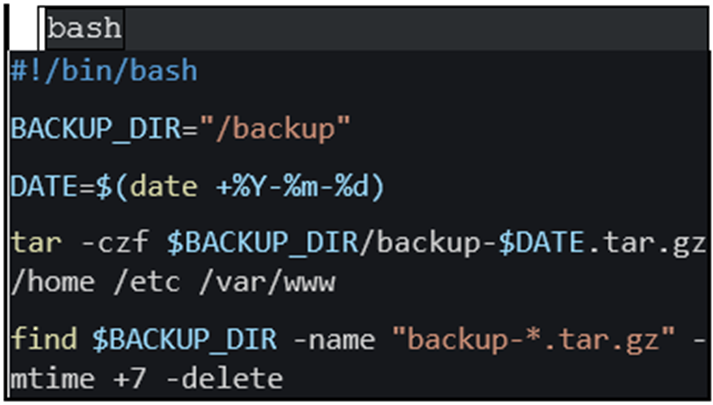 Automated backup script
with encryption
Automated backup script
with encryption
Cron-based scheduling for daily execution at 2:00 AM :
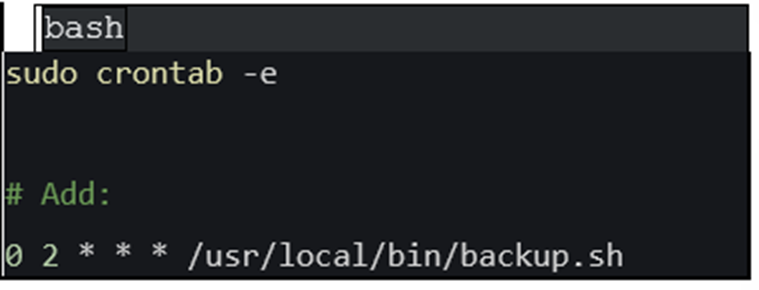 Cron scheduling for
automatic backup
Cron scheduling for
automatic backup
Operational checklist and security hardening of a VPS in production
Apply this checklist to every new server put into production. No step should be skipped.
Security action |
Priority |
|
Update all system packages |
🔴 critique |
|
Enable automatic security updates |
🔴 critique |
|
Create a non-root user with sudo |
🔴 critique |
|
Disable direct SSH login as root |
🔴 critique |
|
Configure SSH key authentication (ed25519) |
🔴 critique |
|
Disable SSH password authentication |
🔴 critique |
|
Set up a ufw firewall |
🔴 critique |
|
Only open strictly necessary ports |
🔴 critique |
|
Install and configure fail2ban |
🟠 haute |
|
Audit and disable unnecessary services |
🟠 haute |
|
Change the default SSH port (22) |
🟠 haute |
|
Configure automatic off-server backups |
🟠 haute |
|
Set up log monitoring (journalctl/siem) |
🟡 recommandé |
|
Enable two-factor authentication (2FA) for SSH |
🟡 recommandé |
Emergency Hardening — 10 Minutes for the Essentials
Do you have an existing server to secure quickly? Here is the minimum sequence to apply immediately, even before addressing the more advanced steps:
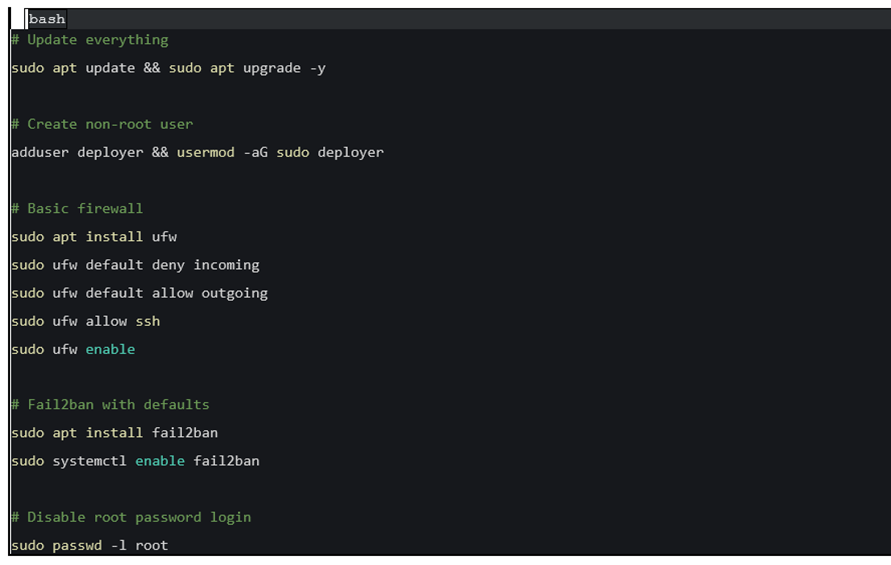 Quick hardening script
— essential commands to execute as a priority
Quick hardening script
— essential commands to execute as a priority
This sequence covers the most exploited attack vectors. It does not replace comprehensive security hardening, but it drastically reduces your exposure in the first few minutes.
Conclusion
The reality of cyberattacks is unrelenting: the majority of server compromises do not result from sophisticated techniques, but from the exploitation of basic negligence. Unrestricted SSH passwords, root accessible from the internet, systems left unpatched for months — these are open doors that attackers cross automatically.
Applying the seven measures described in this guide represents half a day's work. In return, you eliminate the vast majority of common attack vectors and establish a solid foundation for any serious infrastructure. Security is not a one-time project: it is a continuous process that begins with these fundamentals.
ST Digital supports businesses in securing their cloud and on-premise infrastructures.
Need a VPS security audit or a hardening assignment?