

The protection of data has become a critical issue for organisations in the digital era, faced with an alarming increase in cyberattacks. According to the 2024 Data Protection Trends Report by Veeam, 75% of organisations were affected by cyberattacks, often repeatedly. This finding underscores the critical importance of data backup and replication, as backup repositories are targeted in 96% of attacks, successfully affecting that data in 76% of cases.
On average, victims of cyberattacks reported an inability to restore 43% of data affected by ransomware. These statistics highlight the vulnerability of corporate data and the pressing need for robust backup solutions such as those offered by Veeam. Indeed, 93% of ransomware attacks specifically target backups, and 75% of these attacks at least partially achieve their objective, exacerbating risks to business continuity and information security.
In this context, Veeam Backup & Replication stands out as an essential solution, offering not only proactive protection against ransomware, but also advanced data restoration capabilities. This report explores in detail how Veeam simplifies data backup and replication, ensuring continuous and secure availability of critical information for businesses facing the growing challenges of data security.
I- Architecture of Veeam Backup & Replication
Veeam Backup & Replication uses several key components to facilitate data backup and replication in virtual environments. Below is a detailed exploration of each component:
1- Key Components of Veeam
Source hosts and associated Datastores
Source hosts represent the physical or virtual servers on which the virtual machines (VMs) to be backed up reside. Each source host is associated with datastores, which are the storage locations for the VMs[FD1].
Backup proxies
Backup proxies play a crucial role in the backup process. They act as gateways between source hosts and the backup repository. Proxies are responsible for collecting data from VMs, compressing it and sending it to the backup repository. They also optimise data transfers to maximise efficiency and minimise the performance impact on source servers.
Backup Repository
The backup repository is the location where backup data is stored. It can be local storage, network storage (NAS), or even cloud storage. The backup repository retains backup files and ensures their availability for subsequent restores.
Guest interaction proxies
Guest interaction proxies are used for Windows VMs to deploy non-persistent runtime components or, if necessary, persistent agents on guest operating systems. These agents facilitate the management and backup of data at the level of each VM, ensuring comprehensive protection of application data.
Gateway Server (For shared folder repositories)
For shared folder backups, a gateway server is deployed. This server has access to the shared folder backup repository and plays a central role in the secure transfer of data between backup proxies and the repository.
How the backup process works
When a new backup session is initiated, Veeam Backup & Replication orchestrates several key actions to ensure data protection:
- Deployment of runtime components: Guest interaction proxies or gateway servers deploy the necessary agents on the guest operating systems of VMs, ensuring complete data capture.
- Data collection and transformation: Backup proxies collect data from the VMs to be backed up, compress it and prepare it for transfer to the backup repository.
- Data transfer and storage: Veeam Data Movers, both on the source side and the target side, manage the secure transfer of data between source hosts and the backup repository. They optimise data flows by using deduplication and compression methods to minimise the required storage space and accelerate backup times.
3- On-site and off-site Backup
For on-site and off-site backups, Veeam uses specific configurations:
- On-Site Backup : Data is transferred via LAN, using local backup proxies to minimize latency and maximize performance.
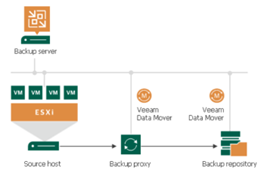
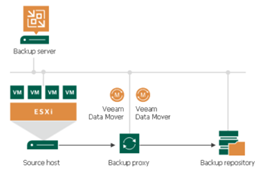
- Off-Site Backup : Data is transferred via secure WAN connections, using distributed backup proxies between the source site and the remote site to optimize transfer efficiency.
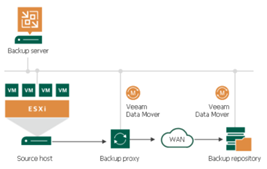
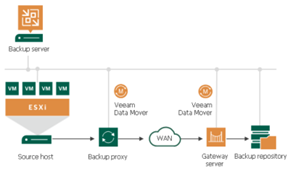
The architecture of Veeam Backup & Replication is designed to provide efficient, secure, and comprehensive management of backups and data replications in virtual environments. By using a combination of backup proxies, backup repositories, and Veeam Data Movers, Veeam ensures the availability and protection of critical data for businesses of all sizes and industries.
3- Role of each component in the backup and replication process
- Coordination and planning: The Veeam Backup server orchestrates all backup and replication operations. It schedules jobs, manages priorities and ensures operational consistency across the infrastructure.
- Transfer optimisation: The Veeam backup proxy optimises data transfers by reducing bandwidth usage and improving overall performance through data compression and deduplication.
- Data storage and management: The Veeam backup repository is responsible for the secure and efficient storage of backed-up data. It also ensures the availability of data for restore operations, in accordance with defined retention policies.
Integration with virtual environments
Veeam Backup & Replication offers deep and native integration with leading virtual environments, including VMware vSphere and Microsoft Hyper-V. This integration enables Veeam to leverage the platform-specific features of each environment while ensuring centralised and simplified management of backup and replication operations.
Support for VMware vSphere
- Native Integration: Veeam is natively integrated with VMware vSphere, enabling direct and optimized communication between Veeam Backup & Replication and the VMware infrastructure. This results in better management of VMs, snapshots, and backup operations.
- Backup consolidation: Veeam uses VMware APIs to perform agentless backups and replications, enabling backup consolidation and optimised use of storage resources.
- Comprehensive VM Protection : Through centralised management, Veeam enables the protection of all VMware VMs, ensuring seamless business continuity without interruption.
Support for Microsoft Hyper-V
- Deep Integration: Veeam also supports Microsoft Hyper-V, offering full integration with the backup and replication features specific to Hyper-V.
- Multi-VM Protection : Thanks to its flexible architecture, Veeam can back up multiple VMs simultaneously, leveraging snapshot technologies built into Hyper-V to ensure data consistency.
- Rapid restoration : In the event of a disaster, Veeam enables fast and reliable restoration of Hyper-V VMs, minimising downtime and ensuring a swift resumption of operations.
Benefits of virtual integration
The close integration of Veeam with virtual environments offers several significant benefits for enterprises:
- Management simplicity : A single management console for all backup and replication operations, regardless of the virtual environment used (VMware or Hyper-V).
- Performance optimisation: Efficient use of storage and network resources through intelligent data management and integrated compression/deduplication.
- Operational flexibility: Ability to adapt to the evolving needs of businesses, by supporting rapid growth in the number of VMs while maintaining short backup times and reduced maintenance windows.
The complete integration of Veeam Backup & Replication with VMware vSphere and Microsoft Hyper-V virtual environments guarantees optimal data protection, simplified management, and continuous availability of critical applications for modern enterprises.
Read our success stories
II- Advanced backup features
1- Forever incremental backup
Forever Incremental backup is an advanced feature offered by Veeam Backup & Replication that revolutionises the way data is backed up and managed. This approach is designed to optimise backup processes while minimising the resources required and accelerating backup times.
2- Forever incremental backup concept
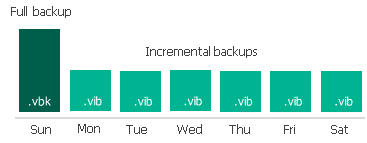
Forever Incremental backup is based on the principle that, after an initial full backup, only the changes made to the data since the last backup are recorded. This model avoids creating repetitive full backups, which can consume significant storage space and time.
- Initial full backup : The first backup performed is a full backup, which captures the entirety of the data. This full backup serves as the base for subsequent incremental backups.
- Incremental backups : After the initial full backup, only changes made to the data are saved during incremental backups. These backups are performed on a regular basis, capturing only the changes since the last incremental backup.
- Full backup retention: Unlike other approaches, Forever Incremental backup does not require the creation of new full backups. Incremental backups are retained alongside the initial full backup, enabling granular restoration while maintaining minimal storage consumption.
3- Reduction of resource impact
One of the main advantages of Forever incremental backup is the significant reduction of the impact on resources, both in terms of storage and performance:
- Storage efficiency: By avoiding the need to create repetitive full backups, forever incremental backup significantly reduces storage space consumption. Only data modified since the last incremental backup is stored, which optimizes space utilization.
- Network resource optimisation: Forever incremental backup minimises the amount of data transferred over the network by backing up only changes since the last backup. This reduces the load on the network and improves the efficiency of backup operations.
- Performance management : The incremental backup process is generally faster than full backups, as it focuses solely on changes made to the data. This reduces backup windows and minimises the impact on system performance during backup operations.
Acceleration of backup times
Forever Incremental backup also contributes to accelerating backup times, which is crucial for production environments where downtime must be minimised:
- Fast Restore : By using the initial full backup as a base and integrating incremental backups, restore processes are faster. Data can be quickly restored from the combination of the full backup and increments, without requiring a new full backup.
- Reduced backup windows : The reduction in size of incremental backups compared to full backups allows for shorter backup operation durations. This enables organizations to reduce backup windows and optimize available resources.
The Forever Incremental backup offered by Veeam Backup & Replication provides an effective solution for backup management by minimising the impact on resources and accelerating backup times. This approach enables companies to protect their data more efficiently while guaranteeing optimal availability and performance.
III- Centralised management and automation
Veeam Backup & Replication excels in centralised management and automation of backup and replication tasks, offering an efficient and consistent solution for complex data environments. These capabilities enable organisations to simplify the management of their backup operations while improving efficiency and responsiveness to data protection requirements.
1- Centralized management console
The centralised management console of Veeam is the key element that facilitates the supervision and administration of backup and replication tasks from a single point. It offers several significant advantages:
- Unified interface :
- The Veeam Backup & Replication console provides a unified graphical interface for managing all backup and replication operations. Administrators can configure, monitor and manage backup jobs, retention policies and replication settings from a single interface.
- This approach reduces the complexity associated with managing multiple separate tools or consoles, thereby simplifying administrative tasks and improving operational efficiency.
- Dashboards and reports:
- Veeam ONE, an extension of the main console, provides detailed dashboards and customisable reports. These tools enable proactive monitoring of backup environments, in-depth performance analysis and the generation of compliance reports.
- Administrators can quickly identify potential issues, monitor trends, and adjust backup policies according to operational needs.
- Alerts and notifications:
- The centralised console allows you to configure alerts and notifications to inform administrators of critical issues, backup failures or threshold breaches. These alerts can be customised to meet the specific needs of the organisation and are essential for proactive incident management.
Automation of backup and replication tasks
Task automation is a key aspect of Veeam Backup & Replication, contributing to the reduction of human errors, the improvement of operational efficiency, and the optimal management of resources:
- Job scheduling :
- Backup and replication tasks can be automated through flexible scheduling features. Administrators can define schedules for backup jobs, establish backup frequencies (daily, weekly, monthly), and configure backup windows tailored to the needs of the organization.
- This feature ensures that backups are performed regularly and in accordance with defined policies, while minimising disruptions to normal operations.
- Scripts and APIs :
- Veeam offers powerful APIs and scripting options to automate backup and replication processes. Administrators can create custom scripts to automate routine tasks, integrate Veeam with other operations management systems, and customise processes to meet the specific needs of the organisation.
- API-based automation also allows integration of Veeam with IT operations management (ITOM) tools and incident management systems for even smoother and more integrated management.
- Backup policy management :
- Backup policies can be automated to apply retention rules, backup strategies and specific configurations to different groups of data or virtual machines.
- Defined policies ensure that data is backed up in accordance with compliance and recovery requirements, without the need for continuous manual intervention.
The centralized management and automation offered by Veeam Backup & Replication enable businesses to streamline their backup and replication operations while ensuring effective and compliant data protection. These features improve operational efficiency, reduce human errors, and guarantee a rapid response to backup and data recovery needs.
IV- Security and compliance
Veeam Backup & Replication incorporates robust security and compliance features to protect data against threats and unauthorised access, and to ensure adherence to data protection regulations. This section explores data encryption mechanisms, access rights and permissions management, and compliance with security standards.
1- Data encryption
Encryption is an essential element for ensuring the confidentiality and integrity of backed-up data. Veeam Backup & Replication offers several levels of encryption to protect data throughout their lifecycle:
- Source-level encryption:
- Veeam enables data to be encrypted at the source level before it is transferred to the backup repository. This process ensures that data is protected during transit, thereby reducing the risk of interception or unauthorised access.
- Source-level encryption uses robust encryption algorithms (AES-256) to secure data before transfer, ensuring their protection throughout the backup process.
- Repository-level encryption:
- Backed-up data is also encrypted when stored in the backup repository. Veeam offers encryption at rest to protect stored data against unauthorized access.
- This feature is critical for protecting data against physical attacks or unauthorised access at the storage level.
- Transfer encryption:
- During data transfer to and from the backup repository, Veeam uses the TLS (Transport Layer Security) encryption protocol to secure data in transit. This protocol protects data against man-in-the-middle attacks and ensures the confidentiality of transferred information.
2- Access rights and permissions management
Effective management of access rights and permissions is essential to ensure that only authorised individuals can access backup data and operations. Veeam Backup & Replication offers sophisticated mechanisms for access management:
- Granular access control:
- Veeam enables the configuration of granular access controls based on user roles. Administrators can define specific roles and permissions for each user or group of users, limiting their access to the functions and data required for their role.
- Preconfigured roles include access rights for backup, replication, and restore operations, as well as backup settings management, enabling fine-grained customisation of permissions.
- Multi-Factor Authentication (MFA):
- To strengthen access security, Veeam integrates multi-factor authentication. This mechanism requires an additional verification (for example, a code sent by SMS or an authentication application) in addition to login credentials, thus reducing the risk of unauthorised access.
- Audit and log management :
- Veeam provides detailed audit capabilities and activity logging. Administrators can monitor and review actions performed within the management console, track configuration changes, and detect unauthorised access attempts.
- Audit logs can be configured to record information on user activities, errors, and critical events, thereby facilitating compliance with regulatory requirements and security audits.
3- Compliance with security standards
Veeam Backup & Replication is designed to help organisations comply with security standards and regulations regarding data protection:
- GDPR Compliance:
- Veeam helps organisations meet the requirements of the General Data Protection Regulation (GDPR) by offering features such as access rights management, personal data protection, and the ability to restore specific data based on data subject requests.
- Security certifications:
- Veeam Backup & Replication complies with various security certifications, such as ISO/IEC 27001 and SOC 2, ensuring that security and data protection practices meet internationally recognised standards.
The security and compliance features of Veeam Backup & Replication provide comprehensive data protection against internal and external threats, while ensuring adherence to data protection regulations. Data encryption, granular access rights management, and compliance with security standards are essential elements that contribute to the robustness and reliability of the Veeam solution.
In summary, Veeam Backup & Replication positions itself as a powerful and comprehensive solution for companies seeking to simplify the management of their backups and data replication. Its combination of efficiency, flexibility, centralised management and robust security enables organisations to protect their critical information while meeting operational and regulatory requirements. Thanks to Veeam, companies can focus on their growth and strategic objectives, with the assurance that their data is protected and accessible under any circumstance.
Sources:
https://helpcenter.veeam.com/docs/backup/vsphere/backup_architecture.html?ver=120
https://www.veeam.com/fr/company/press-release/veeam-data-protection-trends-report-2024.html
https://helpcenter.veeam.com/docs/backup/vsphere/components.html?ver=120
https://www.veeam.com/fr/products/veeam-data-platform/capability/data-protection.html
https://www.veeam.com/fr/products/backup-enterprise-manager.html
Source hosts are associated with datastores, which are the storage locations for the VMs. [FD1]