








Officially released on 21 April 2022, Ubuntu 22.04 LTS – codenamed "Jammy Jellyfish" – is the long-awaited new version of the most popular Linux distribution. It is an LTS (Long-Term Support) release that will be maintained and supported for 5 years by its publisher Canonical, until April 2027.
What is LTS (Long-Term Support)?
LTS or "Long Term Support" releases are published every two years in April by the Canonical teams.
LTS versions are the versions dedicated to production environments for enterprises, and are the most widely used.
Canonical, the publisher of Ubuntu, estimates that 95% of Ubuntu installations use LTS versions.

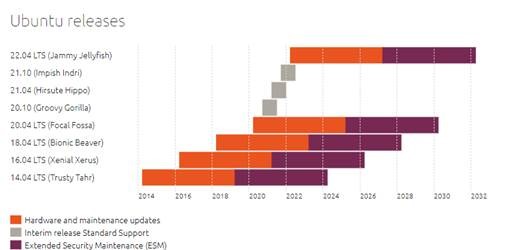
To learn more, we invite you to visit the official page on the Ubuntu website: https://ubuntu.com/about/release-cycle
Among all GNU/Linux users, Ubuntu is used by 32% of them, making it the #1 Linux distribution on the market (source w3techs: https://w3techs.com/technologies/history_details/os-linux).
And all of this, free of charge, with no paid licence! Why ? Because development is community-based: anyone can participate, this part is therefore free, and progress is collective.
The business model of the OpenSource world (of which Ubuntu is part) is based on the skills and services of people (expertise, support, services, guarantees); this part is therefore paid but not mandatory.
What's new in Ubuntu
Ubuntu 22.04 LTS now uses the GNOME 42 desktop environment (released on 23 March 2022) in place of the older version 3.36 used by Ubuntu 20.04 LTS.
GNOME 40 introduced significant changes such as visual improvements (subtle, but welcome) in various parts of the system, workspaces and an application menu that are now organised horizontally (instead of using a vertical layout as in previous versions), new shortcuts, new settings and updates to several integrated GNOME applications.
GNOME 41 and GNOME 42 continued in this direction, also bringing notable and interesting improvements.
Ubuntu 22.04 LTS does not rely entirely on GNOME 42 but instead offers a customised version of it. Ubuntu 22.04 LTS integrates most of the new features of GNOME 42 but also a number of applications and libraries from GNOME 40 (and earlier versions), Canonical – the publisher of Ubuntu – considering that certain changes recently introduced by GNOME are too recent and have not been sufficiently tested to be integrated. Ubuntu 22.04 LTS also includes unique features not found in GNOME that are exclusive to Ubuntu (such as the accent colour, see further below).
Shell (system interface)
Dock: new access to the Recycle Bin and new separator between favorites and other open applications.
Activity overview: new presentation of workspaces with horizontal navigation and the ability to select open applications. It is possible to move between workspaces using new shortcuts (see further below).
Application menu: horizontal scrolling through applications.
Power modes accessible and easily changeable from the status menu.
Microphone: when a call is active, the microphone status is displayed in the status menu in the upper right corner.
Calendar: calendar events appear in the "Clock, Calendar and Appointments" applet located in the top bar.
New shortcuts added to navigate more easily between workspaces and display more quickly the overview of activities and the application menu:
Touch screen: a three-finger swipe left or right moves between workspaces, while a three-finger push upward opens the Activities overview and, if you repeat the gesture, opens the application menu. A three-finger swipe in the opposite direction will bring you back to your workspace.
Keyboard: press Super + Alt + ↑ to access the activities overview, then again to open the applications menu. Press Super + Alt + ↓ or Escape to close the applications menu and again to exit the activities overview. You can use Super + Alt + left/right arrows to move between workspaces.
Mouse: press Super + Alt and scroll the mouse wheel to move between workspaces.
Visual changes: more rounded corners in interface components and in many GNOME applications (such as System Monitor, Characters, or Files) and other visual adjustments.
Better performance.
Applications
GNOME Files – the file manager – has been improved:
Support for password-protected .zip archives (creation and opening).
Ability to sort files by creation date.
A more precise estimate of backup durations.
New location bar with auto-completion.
When you attempt to copy or move a file to a location where a file with the same name already exists, you now have the option to rename the moved file.
Redesigned preferences that facilitate searching and make it easier to find specific settings.
New option "Run as program" when right-clicking on an application binary.
Recycle Bin: addition of an information bar that indicates whether automatic emptying of the Recycle Bin is active, with a quick link to privacy settings (where automatic emptying of the Recycle Bin can be enabled/disabled).
Other new features
Ubuntu now (finally) allows dragging and dropping files and folders between the file manager and the Desktop, and vice versa.
Wayland used by default for user sessions, including for NVIDIA GPU owners. However, it is still possible to select Xorg at login. As a reminder, Wayland is a modern display server protocol and is considered the successor to Xorg.
Linux kernel 5.15 LTS: new driver for the NTFS file system (NTFS3), new SMB file server (ksmbd), improved support for Intel and AMD processors...
Mesa 22.0 graphics driver.
Active Directory support.
nftables is the new default firewall backend and replaces iptables.
Firefox is now installed as a snap package.
Updates to numerous applications: Firefox 98, LibreOffice 7.3, Thunderbird 91, BlueZ 5.63 (Bluetooth), CUPS 2.4 (printers), NetworkManager 1.36, Poppler 22.02 (PDF), PulseAudio 16 (audio).
For developers: PHP 8.1, Ruby 3.0, Golang 1.18, OpenSSL 3.0, GCC 11 (compiler)
The complete and official release note is available here: https://discourse.ubuntu.com/t/jammy-jellyfish-release-notes/24668
Available upon release on the 100% African cloud ST DIGITAL
The ST DIGITAL teams have worked to offer you this brand-new version directly upon its release, so you can benefit from it right now on your ST DIGITAL cloud hosting!