







In the coming weeks, Microsoft will evolve the lock screen experience on Windows with interactive and dynamic weather updates. This change will affect Entra ID Joined (AADJ) and Workplace Joined (Azure AD Registered) devices that have installed the Windows April 2024 security update or later updates for Windows 10 22H2 and Windows 11 23H2. They will then see this "Weather and more" feature on the lock screen.
Behaviour can be managed via Group Policy (GPO) or MDM (Microsoft Intune).
MDM / Microsoft Intune
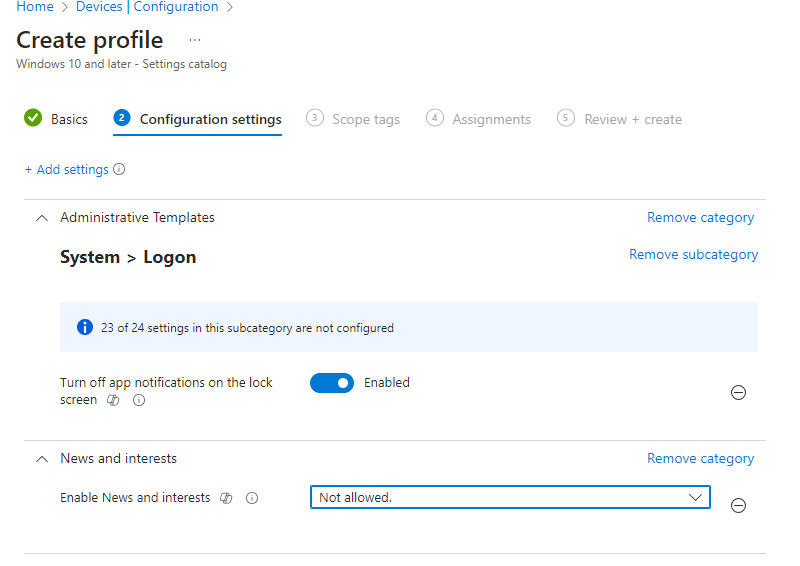
You can use the Settings Catalog by configuring one of the following two settings:
- Enable News and interests specifically for this feature
- Turn off app notifications on the lock screen more broadly, in order to block applications that wish to display content on the lock screen
Group Policy (GPO)
- For Windows 11: You must modify Allow Widgets in Computer Configuration > Administrative Templates > Windows Components > Widgets.
- For Windows 10: You must modify Enable news and interests on the taskbar in Computer Configuration > Administrative Templates > Windows Components > News and interests.
- More generally, you can use Computer Configuration > Administrative Templates > System > Logon > Turn off app notifications on the lock screen, in order to block applications that wish to display items on the lock screen
More information on:Configuring weather and more on the lock screen in Windows | Windows IT Pro blog (microsoft.com)
Read also:
Your dynamic snippet will be displayed here... This message is shown because you have not defined the filter and template to use.